
Automatically Reorganize Photo Folders by Photo Taken Date
Foreword: This post is not specific to Picasa, so don’t be put off by the first couple paragraphs if you don’t happen to use it.
I love Picasa, but for the longest time it had a major annoyance: when downloading photos from your camera it would stick them in a folder dated according to the download date, not the date the picture was actually taken. This has been fixed in recent versions of Picasa, and there is now an option when importing to organize the downloads by date taken:
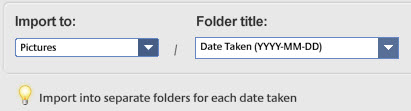
The problem is, the folder names are what is displayed to you in the Picasa interface, and I had almost 6,000 old photos stored in folders according to download date rather than taken date. I needed a way to automatically reorganize my old photos into a consistent directory structure that used the right dates. I thought I’d find a free tool that would do this easily, and I did, but it’s not easy for a casual user, so I thought I’d write up the steps.
First, MAKE A BACKUP. You have been warned. Okay, backup safely stowed away, go to wherever you keep your photos. We’ll call it Pictures. You probably have a pile of subdirectories there that that look like this:
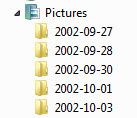
In Pictures, create a folder called “old”. Move ALL the subfolders and photos from Pictures to Pictures/old:
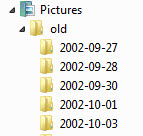
Next, download ExifTool and unzip the contents to the “old” folder. Rename the resulting file from exiftool.exe to exiftool.exe. This is the tool that will do all the renaming work for you.
So now the “old” folder should contain all your photos (most if not all in badly dated subfolders) and exiftool.exe. While holding down the SHIFT key RIGHT-click the “old” folder. Pick “Open Command Window Here” (note that this option will only appear if you are right-clicking a folder in the RIGHT Explorer pane - stupid Windows). At the prompt, type:
<blockquote>exiftool “-Directory<DateTimeOriginal” -d “../new/%Y-%m-%d” -r .</blockquote>
… and hit ENTER. After churning for awhile and possibly throwing a ton of warnings (some might be important, although for my run none were), it will eventually finish like so (I’ve included some sample warnings):
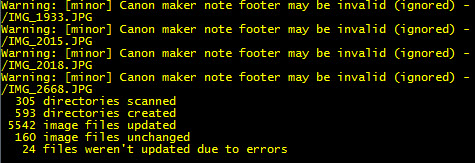
At this point, most of if not all of your photos have been moved from the “old” directory to a set of properly dated subdirectories in a new “new” directory:
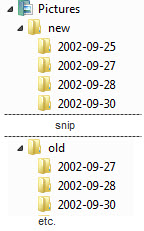
If you’re like me though, some photos (and all videos) might lack the metadata needed for ExifTool to work its magic. I was going to suggest you use Windows Search to find those files, but I just tried that, and it sucks mightily. It missed a TON of photos and videos that I would have lost had I not double-checked. Stupid Windows. So instead, install the Everything search engine, let it do its indexing, then right-click the “old” folder and pick “Search Everything…”
(If I were the MS employee in charge of search I’d hang my head in shame for being so outclassed by a third-party file finder.)
You can then copy-and-paste (or cut-and-paste, or drag-and-drop) all the photos (be sure to look for video files too) that were left behind and put them in a new folder under “new” called “undated” (or whatever you want).
Finally, move all the properly dated subfolders under “new” back up to Pictures, and delete the “old” and “new” folders. The next time you fire up Picasa it might take awhile for it to load as it recompiles all the metadata and whatnot, but when it’s done its UI should reflect the new properly dated folder structure. And since it will respect this structure on future imports, you’ll hopefully never have to do this again.